
Mission 4 · Use the features
How to send and receive crypto on Hata
Receive crypto on the right network, send it out with Travel Rule details, the minimum deposit per coin, network fees, and why to turn off Send if you never use it.
Quick answer
- Choose the same network on both sides. If you pick the wrong network, your money is lost.
- Sending out needs the recipient's name, the wallet type (exchange or private), an email code and 2FA.
- Receiving crypto is free, but each coin has a minimum amount.
What you need
- The recipient's wallet address (copy it, do not type it)
- Knowing which network the recipient's wallet supports
- Your phone for 2FA, and access to your email
Network: the most important thing
The network is the blockchain that carries the coin. For example, USDT can move on ERC20 (Ethereum), BEP20 (BNB Chain) or TRC20 (TRON). The sender and the recipient must use the same network.
A simple tip: send a small amount first as a test. Once it arrives, send the rest.
Receiving crypto (Receive)
Wallet → coin → Receive → choose the network → copy the address. Paste that address on the platform that is doing the sending.
Receiving crypto is free (each coin has a minimum)Crypto receive fee: free (each coin has a minimum). The minimums for some coins:
- BTC: 0.0002 BTCMinimum BTC deposit: 0.0002 BTC
- ETH: 0.004 ETHMinimum ETH deposit: 0.004 ETH
- XRP: 10 XRPMinimum XRP deposit: 10 XRP
- SOL: 0.015 SOL (deposits from smart contracts are not credited)Minimum SOL deposit to Hata: 0.015 SOL (deposits from smart contracts are not credited)
- Other coins: check the Receive screen in the app.
If you send less than the minimum, the coin is not credited automatically. You can ask for a recovery: can be requested, 1 to 3 business days, with conditionsRecovering a below-minimum deposit: can be requested, 1 to 3 business days, with conditions. The condition is that you send another amount above the minimum to the same address, and give both transaction IDs.
Sending crypto out (Send)
01/05
Receive: choose the network first
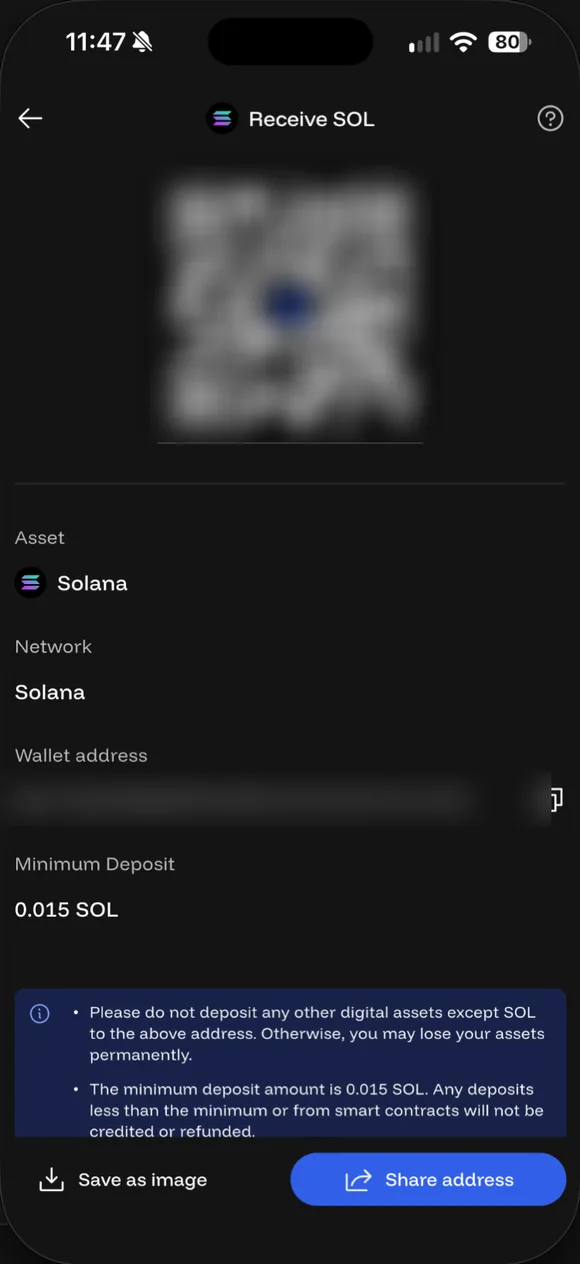
Wallet → Crypto → Receive → pick the coin → pick the network. The screen shows the address, QR code and minimum deposit (SOL: 0.015 SOL). Daus's address is blurred.
- Receive: choose the network first. Wallet → Crypto → Receive → pick the coin → pick the network. The screen shows the address, QR code and minimum deposit (SOL: 0.015 SOL). Daus's address is blurred.
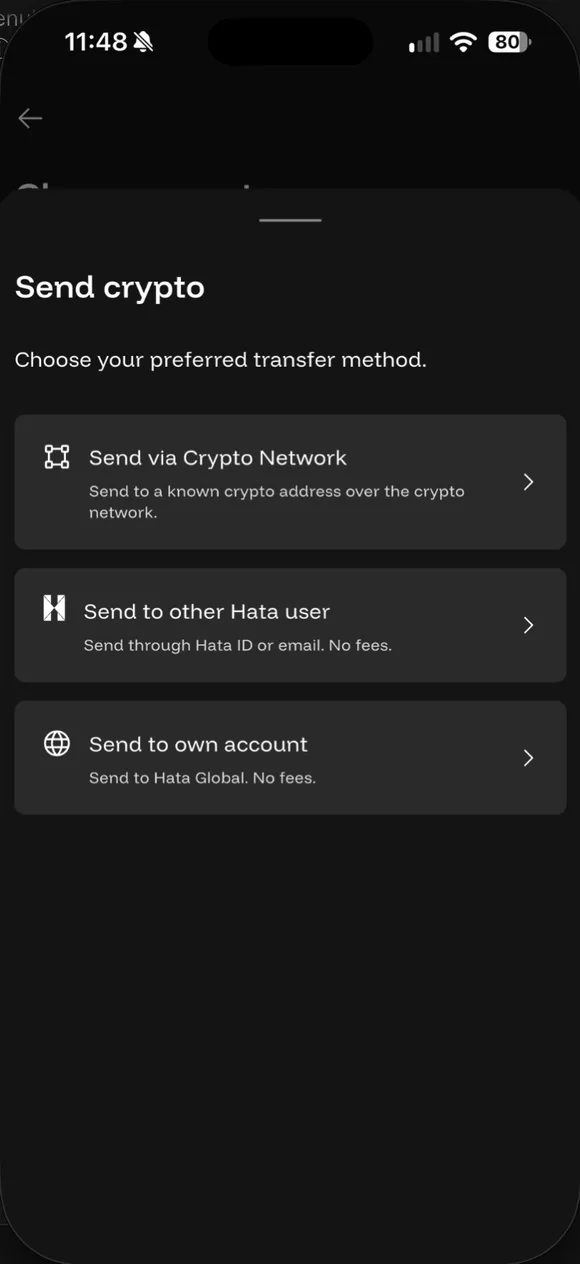
- Send: pick how to send. Wallet → Crypto → Send → pick the coin. Three ways: over the crypto network, to another Hata user (Hata ID or email, no fee), or to your own Hata Global account (no fee).
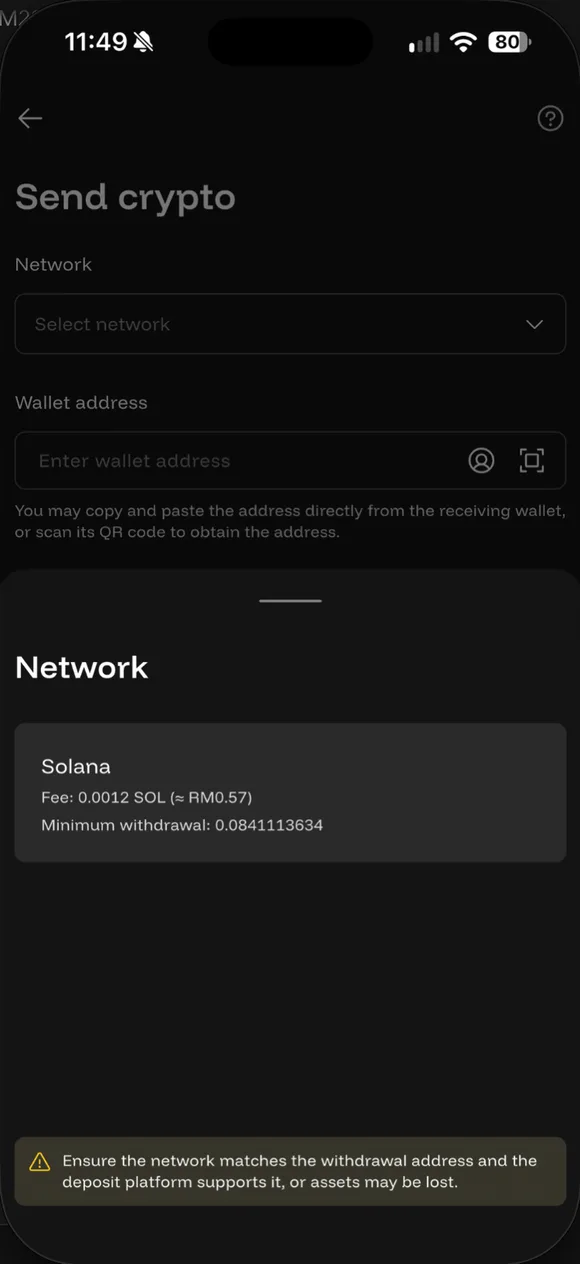
- Pick the network, fee and minimum. Send via Crypto Network → Network. Each network shows its fee and minimum. SOL example: fee 0.0012 SOL (≈RM0.57), minimum 0.0841 SOL. Pick the network the receiving wallet supports, not the cheapest one.
- Address and recipient details. Paste the address (don't type it). Fill in the recipient name and choose Exchange or Private Wallet. This is the Travel Rule.
- Email code and 2FA. Enter the code from your email and your 2FA code, then send.
Travel Rule: why Hata asks for the recipient’s name
The Travel Rule is an anti-money-laundering rule that the SC and the Labuan FSA require. When you send to another platform, you have to give the recipient’s name, and choose whether the address is an Exchange (for example Binance, Coinbase) or a Private Wallet (for example MetaMask, Trust Wallet). If you are sending to your own wallet, tap My address.
When you receive from another platform, Hata may email you asking for the sender’s details. Fill them in quickly so that future deposits do not get stuck.
Sending fee
The fee is set by the network, changes often, shown on the Send screenCrypto send fee: set by the network, changes often, shown on the Send screen. This fee is paid to the network validators, not to Hata. The minimum amount you can send also depends on the network, and both appear when you pick the network. Example for SOL in the app on 22 Sep 2026: fee 0.0012 SOL (about RM0.57), minimum send 0.0841 SOLSOL send fee and minimum: fee 0.0012 SOL (about RM0.57), minimum send 0.0841 SOL.
Sending to another Hata user
You can also send to another Hata user with their Hata User ID or email, or move crypto to your own account on the other platform (cross-platform transfer). Both carry no feeSending to another Hata user or your own Hata Global account: no fee because they don’t go through the blockchain. Each of these asks for an email code and 2FA.
Never send crypto out? Turn off Send
Sent to the wrong address, can you get it back?
Usually not. Hata cannot reverse a transaction that has already been sent. If the address belongs to another platform, contact that platform’s support with the transaction ID. If you know the owner of the address, contact them directly.
Common questions on this topic
Can I send crypto to an outside wallet?
Yes. Pick the coin in Wallet → Send → Send via Crypto Network, choose the network the receiving wallet uses, paste the address and fill in the recipient details. Then enter the email code and 2FA.
Source: Hata Help Centre #618981 ↗
What is a network, and why does it matter?
A network is the blockchain that carries the coin, such as ERC20 (Ethereum), BEP20 (BNB Chain) or TRC20 (TRON). You must pick the same network the receiving wallet uses. Hata itself warns: pick the wrong network and the money is lost. Don't just pick the cheapest.
Source: Hata Help Centre #618981 ↗ · Hata Help Centre #618977 ↗
What is the Travel Rule?
A rule required by the SC and Labuan FSA: when sending to another platform, you must give the recipient's name and whether the address is an exchange or a private wallet. When receiving from another platform, Hata may email you for the sender's details. It is not optional.
Source: Hata Help Centre #607826 ↗
Sent to the wrong network or address. Can I get it back?
Usually not. Hata cannot reverse a transaction once sent. If the address belongs to another platform, contact that platform's support with the transaction ID.
Source: Hata Help Centre #618987 ↗
What's the minimum crypto deposit?
Free, but each coin has a minimum: BTC 0.0002, ETH 0.004, XRP 10. For other coins, check the Receive screen in the app. Below the minimum, the coin isn't credited automatically and needs a manual recovery request.
Source: Hata Help Centre #618978 ↗ · Hata Help Centre #618990 ↗
Why does Hata recommend disabling crypto sends?
If you never send crypto out, switch Send off so a hacker can't move your crypto even if they get into your account. Turning it back on needs MFA and has a 24-hour wait. The setting is under Profile → Security → Send Crypto.
Source: Hata Help Centre #619036 ↗
What's the fee to send crypto?
Network fees change with blockchain congestion and the network you pick. The current amount shows on the Send screen before you confirm. The fee goes to validators, not Hata.
Source: Hata Help Centre #618983 ↗

Already have a Hata account?
Open the app and do this step now, while it is fresh in your mind.
Risk: Crypto prices can fall more than 50%. Daus is currently at a loss too. Rewards and rebates are not guaranteed. Not financial advice.