
Support
How to contact Hata support
Contact Support in the app, the headset icon in the help centre, what to attach to a ticket, Hata's official social media, and why Hata never DMs or calls you first.
Quick answer
- In the app: Contact Support. On the web: hata.io → Help Centre → the headset icon at the bottom right.
- Attach a screenshot, and explain the date, the amount and what happened.
- Hata has no support phone number, and never DMs you first.
What you need
- Your Hata account email
- A screenshot of the problem (PDF, JPG, PNG or TIFF)
Two official doors
01/03
Contact Support in the app
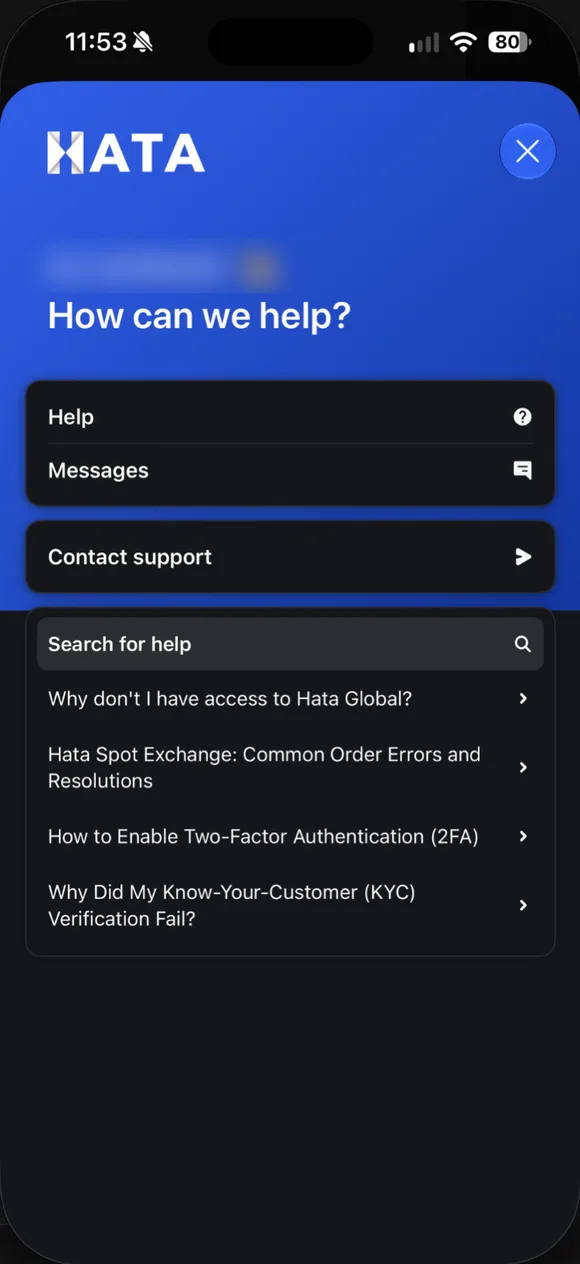
Profile → Support (the headset icon at the bottom of the menu). It has Help, Messages and Contact support, plus popular articles. Name blurred.
- Contact Support in the app. Profile → Support (the headset icon at the bottom of the menu). It has Help, Messages and Contact support, plus popular articles. Name blurred.
- Or the headset icon on the web. hata.io → Help Centre → the headset icon at the bottom right.
- Fill in the ticket. Name, email, description and attachments (PDF, JPG, PNG or TIFF). Never include a password or OTP.
In the app: tap Contact Support, choose the option closest to your problem, fill in your name and email, describe the problem, and attach evidence.
On the web: open hata.io, scroll to the bottom, and tap Help Centre under Explore. In the help centre, tap the headset icon at the bottom right for live chat or a ticket.
What to write in a ticket
- What you were trying to do, and what happened.
- The date and time, the amount, and the coin or pair (for example BTC/MYR).
- The error message that appeared, exactly as it is on screen.
- The transaction ID if it is about sending or receiving crypto.
Never write your password, OTP or 2FA code in a ticket.
Hata’s official social media
Facebook hatamalaysiaofficial, Instagram, X and LinkedIn hataglobal, YouTube hatamalaysiaofficial, TikTok hata.official, and Telegram hataglobalofficial. These accounts are for news and announcements, not for managing your account.
Common problems and shortcuts
- KYC stuck, OTP not arriving, lost 2FA: stuck account.
- Slow withdrawal: how to withdraw.
- Rebate not showing up: reward page.
Common questions on this topic
"Hata support" called me. Is it real?
No. Hata has no phone support. Anyone calling, WhatsApping or Telegramming you claiming to be Hata is a scammer: block and report them. Contact Hata only through Contact Support in the app or the headset icon in the help centre.
Source: Hata Help Centre #619029 ↗

Already have a Hata account?
Open the app and do this step now, while it is fresh in your mind.
Risk: Crypto prices can fall more than 50%. Daus is currently at a loss too. Rewards and rebates are not guaranteed. Not financial advice.