
Mission 3 · Deposit & first buy
How to put ringgit into Hata
Deposit MYR into Hata with FPX or eWallet. RM2 minimum, RM250,000 FPX and RM1,000 eWallet limits, charges, why the bank name must match, and what pending means.
Quick answer
- Wallet → Fiat (MYR) → Deposit → choose FPX or eWallet → type the amount → pay at your bank.
- The minimum is RM2. FPX goes up to RM250,000; eWallet goes up to RM1,000 within 24 hours.
- The money must come from an account in your own name, otherwise it is returned with a RM0.50 charge.
What you need
- A Hata account that has passed KYC
- Online banking or an eWallet in your own name
Two ways to put in ringgit
Hata Malaysia accepts FPX (via Curlec or RevPay, from your own bank account) and eWalletRinggit deposit methods: FPX (via Curlec or RevPay, from your own bank account) and eWallet. There are no cash, cheque or credit card deposits. A debit card can only be used for Auto-Invest, not for regular deposits.
| Method | Minimum | Maximum |
|---|---|---|
| FPX | RM2Minimum deposit: RM2 | RM250,000FPX deposit limits: RM2 to RM250,000 |
| eWallet | RM2Minimum deposit: RM2 | RM1,000 in 24 hourseWallet deposit limits: RM2 to RM1,000 (rolling 24-hour limit) |
For large amounts, use FPX. The eWallet limit is counted on a rolling basis: it only resets 24 hours after your last transaction.
Follow each screen
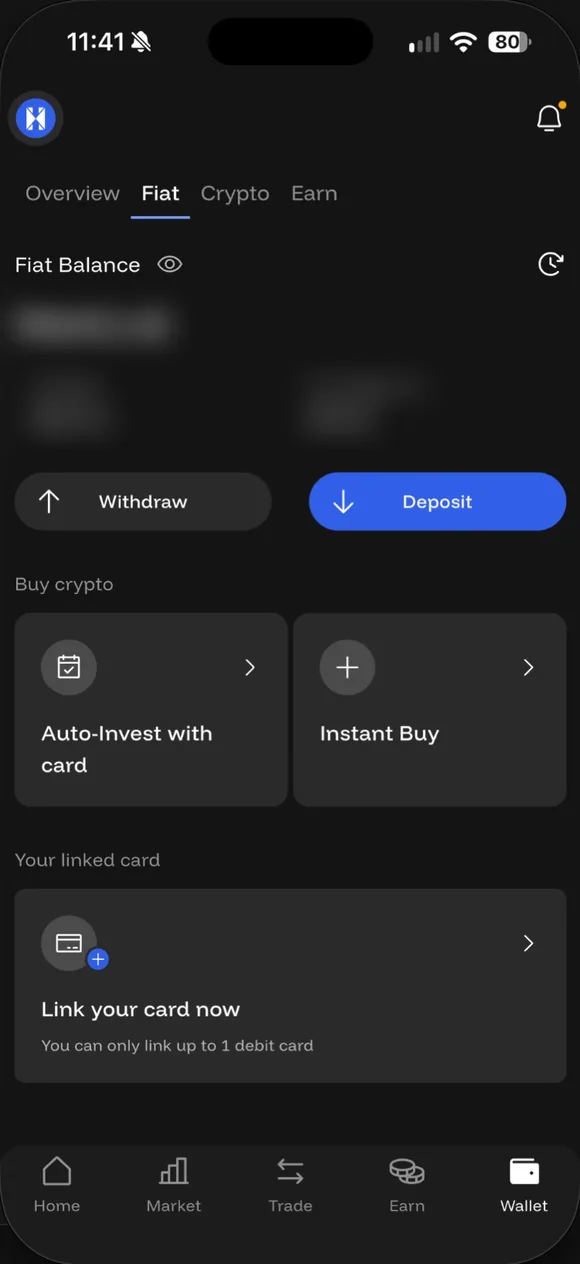
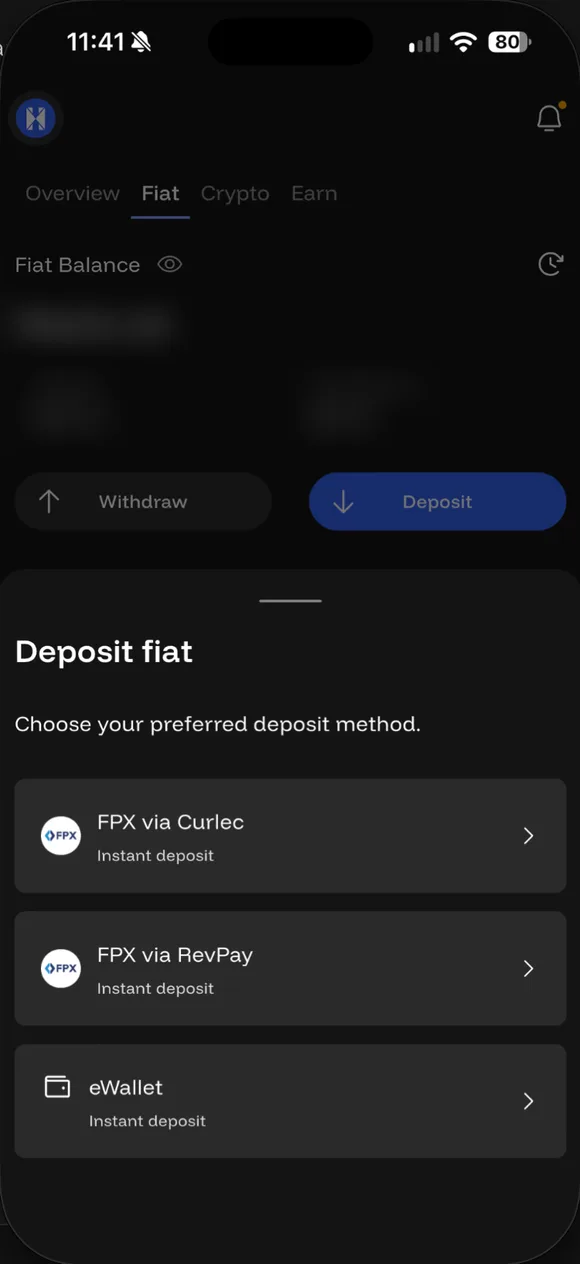
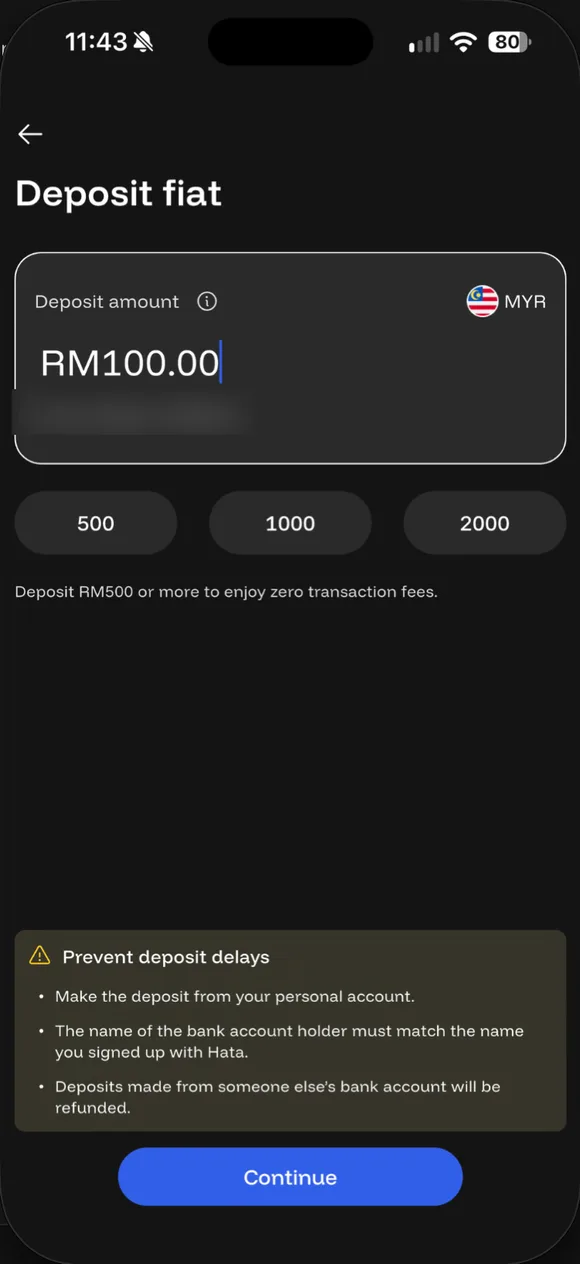
01/07
Wallet → Fiat → MYR
Open the Wallet tab, choose Fiat, then tap Deposit. Daus's balance is blurred.
- Wallet → Fiat → MYR. Open the Wallet tab, choose Fiat, then tap Deposit. Daus's balance is blurred.
- Choose a deposit method. Three options: FPX via Curlec, FPX via RevPay or eWallet. Both FPX options work the same for you; pick either.
- Type the amount. RM2 minimum. The FPX screen says Deposit RM500 or more to enjoy zero transaction fees. Read the yellow box: pay from a bank account in your own name.
- Tap ⓘ for the limits. The ⓘ next to Deposit amount shows the limits: RM2 minimum, RM250,000 maximum by FPX and RM1,000 by eWallet.
- Continue to FPX. You are taken to the payment provider to choose your bank. Pay from an account in your own name.
- Deposit successful. Back in Hata, the money lands in your MYR wallet.
- Check the history. The deposit status in your transaction history.
The bank name must match
This is the most common reason deposits fail. The name of the bank account holder must match the name on your Hata account.
That means you should not deposit using your husband’s, wife’s, parents’ or company’s account. Even if you get the money back, it is stuck for a few days and you are charged for it.
Are there charges?
In the app: no charge on FPX deposits of RM500 or more; below RM500 and eWallet carry a charge, shown before you payFPX / eWallet deposit charge: no charge on FPX deposits of RM500 or more; below RM500 and eWallet carry a charge, shown before you pay. The FPX amount screen itself says “Deposit RM500 or more to enjoy zero transaction fees”. If you’re putting in a few hundred ringgit anyway, one RM500 deposit beats several small ones. Check the charge on screen before you pay, because charges can change.
Work out when the money arrives
When will this deposit land?
Pick the method, amount and time. Daus checks the limits and tells you what to expect.
What to expect
Amount is within the limits.
Money lands in your MYR wallet once the payment succeeds at your bank. Hata publishes no fixed time, so check your transaction history in the app.
The bank account name must match your Hata account name. Deposits from someone else's account are refunded with a RM0.50 charge.
If the money does not arrive
- Check the transaction history in the app. A pending status means Hata is still waiting for payment confirmation.
- Make sure your bank has deducted the money.
- Make sure the bank account is in your name.
- If your bank has deducted the money but your MYR wallet is still empty, open a ticket through Contact Support with a screenshot of your bank receipt.
How much to put in to start
There is no right amount. To learn, RM30 to RM100 is enough: Instant Buy has a minimum of RM30Instant Buy minimum: RM30, and Auto-Invest has a minimum of RM30 per coinAuto-Invest minimum (from MYR wallet): RM30 per coin. Only put in money you can bear to watch fall by half.
Common questions on this topic
How do I put money in?
In the app: Wallet → Fiat (MYR) → Deposit, choose FPX or eWallet, type the amount and pay at your bank. The money must come from an account in your own name.
Source: Hata Help Centre #618957 ↗
What is the minimum deposit?
RM2, for both FPX and eWallet.
Source: hata.io/en/my/fees ↗
What is the maximum deposit?
FPX up to RM250,000. eWallet up to RM1,000, on a rolling 24-hour limit from your last transaction.
Is there a deposit fee?
FPX deposits of RM500 or more have no charge; the app says so on the amount screen. Below RM500 and eWallet deposits carry a small charge, and the amount appears in the app before you pay.
Source: Hata app (App Hata, Deposit fiat → FPX via Curlec, 22 Sep 2026) · hata.io/en/my/fees ↗
Can I deposit from my spouse's or company's bank account?
No. The bank account holder's name must match your Hata account name. Deposits from someone else's account are refunded with a RM0.50 charge, and Hata does not cover bank charges.
Source: Hata Help Centre #618957 ↗
My deposit hasn't arrived. What now?
First check the status in your transaction history, and make sure the money came from an account in your name. If your bank deducted it but Hata has not credited it, open a ticket through Contact Support with proof of payment.
Source: Hata Help Centre #618957 ↗ · Hata Help Centre #607829 ↗
Can I use a credit card?
No. Deposits are only via FPX or eWallet. Debit cards (Visa or Mastercard from Malaysian banks) can only be used for Auto-Invest.
Source: Hata Help Centre #618957 ↗ · Hata Help Centre #619011 ↗

No Hata yet? Sign up with code AF01JCMFAA
Sign up with code AF01JCMFAA (at sign-up, or within 30 days under Profile → Rewards). 10% of every trading fee you pay comes back to your wallet monthly. Not free money: a lifetime fee rebate.
Daus is a Hata affiliate and earns a commission when you sign up with this code or link and trade. It costs you nothing extra; your 10% rebate comes from Hata under their T&C. Daus is not a Hata employee or official representative. Not financial advice.
Risk: Crypto prices can fall more than 50%. Daus is currently at a loss too. Rewards and rebates are not guaranteed. Not financial advice.