
Support
Lock down your Hata account
2FA and Authenticator apps, passkeys, the anti-phishing code, turning off Send Crypto, API keys, fake support numbers, and Daus's real accounts so you are not scammed.
Quick answer
- Turn on a passkey or an Authenticator app, and set an anti-phishing code.
- Never send crypto out? Turn off Send Crypto.
- Hata has no phone support. Daus's only real accounts are @dausdkofficial, @dausdk37 and @dauskewangan.
What you need
- A phone with an Authenticator app (optional)
- 10 minutes
Five locks you should turn on
01/04
Profile → Security
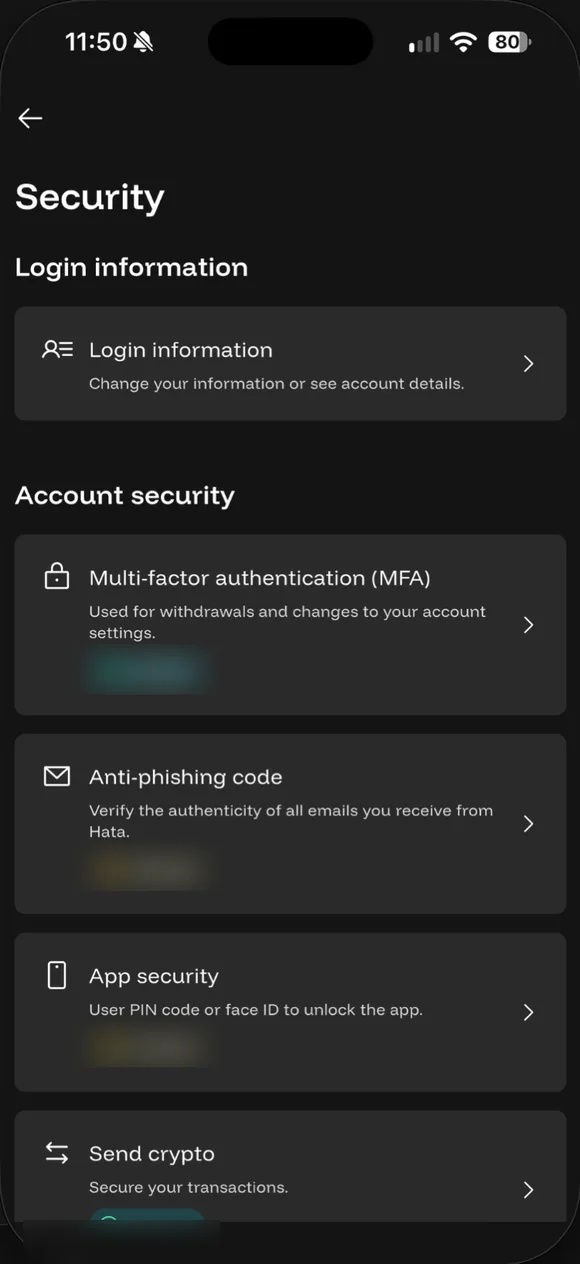
Profile → Security: Multi-factor authentication (MFA), Anti-phishing code, App security (PIN or Face ID) and Send crypto. Daus's statuses are blurred.
- Profile → Security. Profile → Security: Multi-factor authentication (MFA), Anti-phishing code, App security (PIN or Face ID) and Send crypto. Daus's statuses are blurred.
- Create a passkey. Passkeys → Create a Passkey. Use Face ID or a fingerprint to verify yourself.
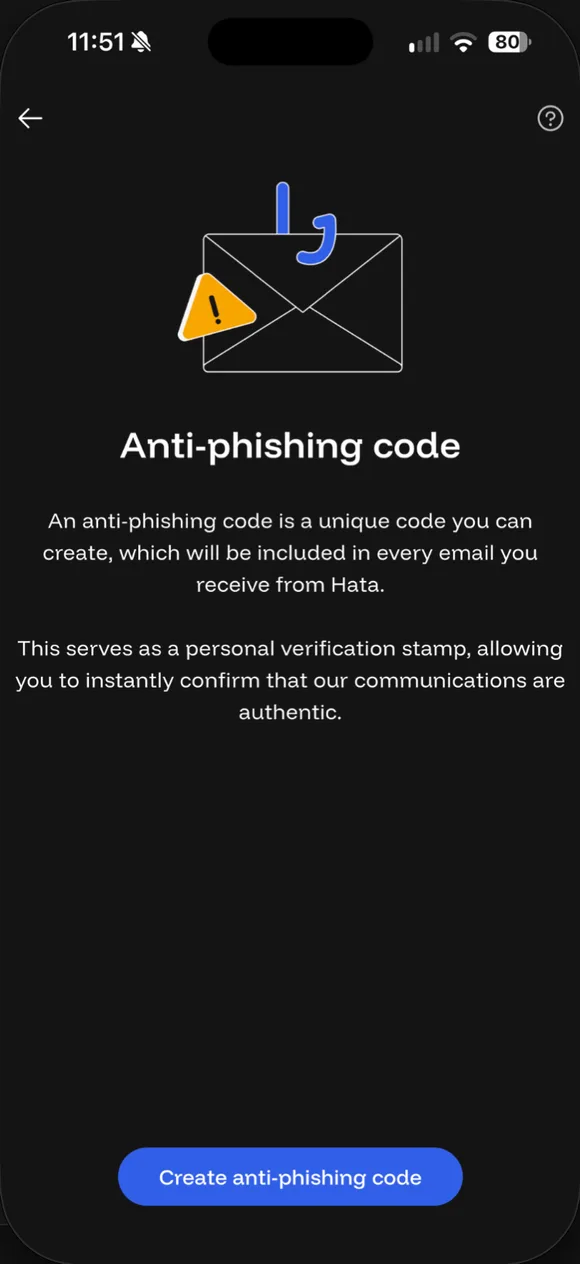
- Set an anti-phishing code. Anti-phishing code → Create anti-phishing code. The code appears in every official Hata email, so fake emails are easy to spot.
- Turn off Send Crypto. Security → Send crypto → Disable crypto sends. If you never send crypto out, turn it off. Turning it back on has a 24-hour wait. There's also an option to disable it permanently.
1. 2FA with an Authenticator app
When you register, Hata asks for a phone number for 2FA. You can also use an Authenticator app: Profile → Security → Multi-Factor Authentication. Keep the 16-digit backup code somewhere safe; that code is what saves you if you lose your phone.
2. Passkey
A passkey uses Face ID, your fingerprint or a security key to confirm it is you, without typing a code. Set it up in Profile → Security → Passkeys → Create a Passkey. You need iOS 16 or Android 9 and above.
3. Anti-phishing code
A secret code of 4 to 20 characters that you choose yourself. Hata puts this code in every official email. An email without that code, or with a different code, is probably fake: do not tap any link in that email.
4. Turn off Send Crypto
If you only buy and hold, turn off sending crypto out: Profile → Security → Send Crypto. When it is turned off, no crypto can leave the account, even if a hacker manages to log in. Turning it back on needs MFA, and there is a waiting period of 24 hoursCooldown when re-enabling crypto sends: 24 hours as a security buffer.
5. Do not create an API key unless you need one
API keys are only for people who use bots or their own programs. If you do not know what that is, do not create one.
Common scams
- Fund recovery scams: “we can get back the crypto you lost, just pay first.” No one can.
- Investment scams: promises of fixed profits, “signals” or “managed investment accounts”. All of these are red flags.
- Daus impersonators: Daus’s only real accounts are @dausdkofficial, @dausdk37 and @dauskewangan. Daus never DMs you first to ask for money or OTPs, or to promise profits.
- Fake links: only log in through the official app or app.hata.io.
Jailbroken or rooted phones
Hata blocks the app on jailbroken or rooted phones for security reasons. Use a regular phone for finance apps.
If your account has already been compromised
- Change your password and turn off Send Crypto immediately.
- Open a ticket through Contact Support and explain what happened.
- If money was stolen, report it to the police as well.
Common questions on this topic
Why does Hata recommend disabling crypto sends?
If you never send crypto out, switch Send off so a hacker can't move your crypto even if they get into your account. Turning it back on needs MFA and has a 24-hour wait. The setting is under Profile → Security → Send Crypto.
Source: Hata Help Centre #619036 ↗
Is 2FA required?
At sign-up, Hata asks for a phone number for 2FA. You can also use an Authenticator app or a passkey. Sending crypto out needs an email code and 2FA.
Source: Hata Help Centre #610454 ↗ · Hata Help Centre #619020 ↗ · Hata Help Centre #619021 ↗
What is a passkey?
A way to log in and confirm actions with Face ID, a fingerprint or a security key, without typing codes. Set it under Profile → Security → Passkeys. Needs iOS 16 or Android 9 or later.
Source: Hata Help Centre #619021 ↗
What is an anti-phishing code?
A secret code (4 to 20 characters) you choose, which Hata puts in every official email. An email without it, or with a different code, is probably fake. Never share the code with anyone.
Source: Hata Help Centre #619037 ↗
"Hata support" called me. Is it real?
No. Hata has no phone support. Anyone calling, WhatsApping or Telegramming you claiming to be Hata is a scammer: block and report them. Contact Hata only through Contact Support in the app or the headset icon in the help centre.
Source: Hata Help Centre #619029 ↗
Which accounts are really Daus's?
@dausdkofficial, @dausdk37 and @dauskewangan. Daus never DMs first asking for money, OTPs or promising profits. Other accounts using Daus's name or photo are impersonators.
Source: Daus ()
Lost my phone. What about 2FA?
If you saved the 16-digit backup code when setting up the Authenticator, use it. If not, open a 2FA reset ticket via the help centre; Hata will ask you to verify your identity.
Source: Hata Help Centre #619020 ↗ · Hata Help Centre #619024 ↗

Already have a Hata account?
Open the app and do this step now, while it is fresh in your mind.
Risk: Crypto prices can fall more than 50%. Daus is currently at a loss too. Rewards and rebates are not guaranteed. Not financial advice.