
Mission 5 · Sell & withdraw
How to sell crypto on Hata
Sell with Instant Sell or Spot, sell only part of your coins, the 1% fee in MYR, why staked SOL cannot be sold, and how to read Today's PnL in the app.
Quick answer
- Trade → Instant → Instant Sell. Choose the coin, type the amount, then tap Request quote and Accept quote.
- The Instant Sell fee is 1%, taken in MYR. The ringgit goes straight into your MYR wallet.
- SOL that is being staked cannot be sold until deactivation is over.
What you need
- Coins in your crypto wallet
Two ways to sell
- Instant Sell: the easiest way. The fee is 1% (shown on the quote)Instant Buy / Instant Sell fee: 1% (shown on the quote), taken in MYR.
- Spot: you place your own sell order. Taker 0.40%Spot taker fee (lowest tier): 0.40%, maker 0%Spot maker fee: 0%. Only for pairs that have Spot.
Follow the screens one by one
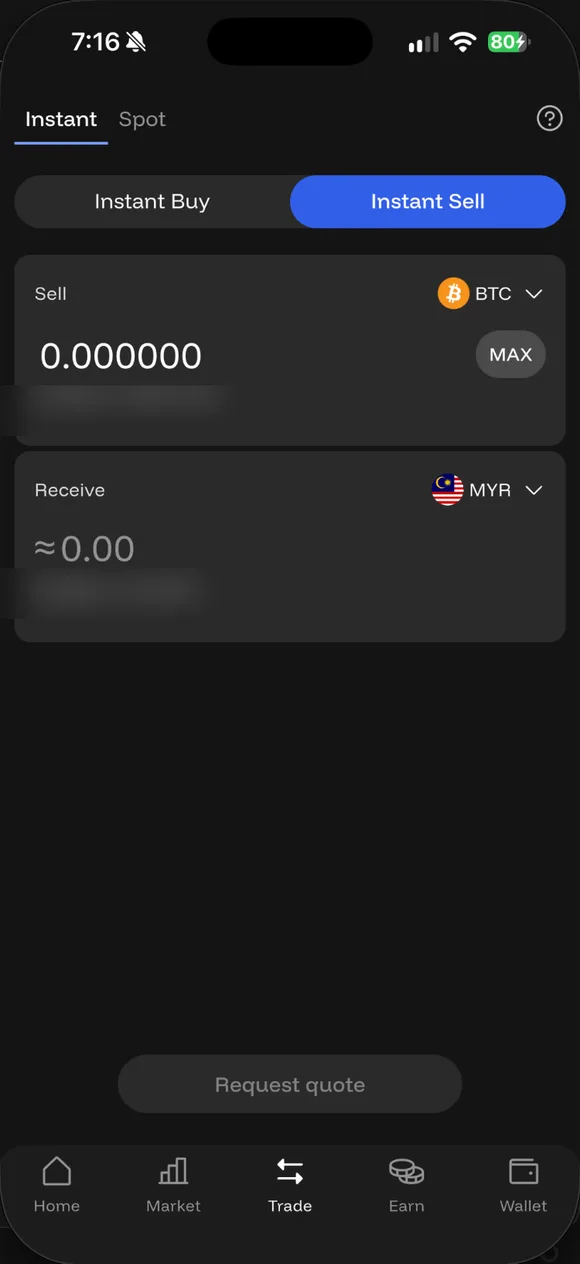
01/03
Instant Sell
Trade → Instant → Instant Sell. Pick the coin and type the amount. The minimum is about RM30 in value.
- Instant Sell. Trade → Instant → Instant Sell. Pick the coin and type the amount. The minimum is about RM30 in value.
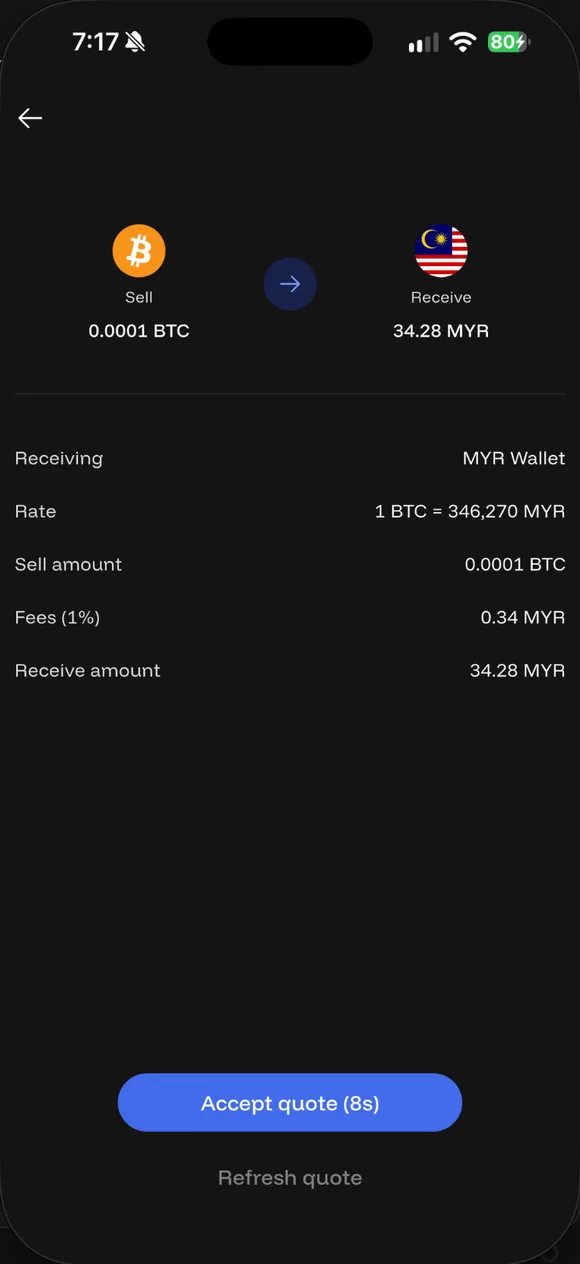
- Request quote, Accept quote. The quote shows the rate, Fees (1%) in MYR, and what you receive. Accept before the countdown ends.
- MYR lands in your wallet. Ringgit goes straight into your MYR wallet. From there, withdraw to your bank.
What the sell quote shows
The quote shows the rate, the amount of coin being sold, Fees (1%) in MYR, and the amount of ringgit you will receive. Just like buying, the quote is valid for about 8 secondsInstant quote validity: about 8 seconds.
Selling only part
You do not have to sell everything. Type the amount you want, as long as it is above the minimum (roughly RM30 worth of the coin). The rest stays in your wallet.
Staked SOL
SOL that is locked in staking cannot be sold. You have to unstake and wait for deactivation to finish first, and unpaid rewards are forfeited if you unstake early. The details are in the staking tutorial.
Understanding PnL in the app
The Hata app now only shows Today’s PnL, which is the change in your portfolio value today compared with the start of the day, excluding that day’s deposits and withdrawals. It is not your overall profit or loss since you started.
To see the profit or loss of an Auto-Invest plan, open Auto-Invest: that screen shows Total Invested and the PnL of each plan. For manual purchases, keep your own records of the date, the amount and the price.
Getting the money from a sale to your bank
Ringgit from a sale goes straight into your MYR wallet. To take it out to your bank, follow the withdrawal tutorial.
Common questions on this topic
Can I sell just part of it?
Yes. Instant Sell accepts amounts down to about RM30 in value (for example 0.000085 BTC on 22 Sep 2026). The rest stays in your wallet.
Source: Hata app (app Hata, 22 Sep 2026)
Where does the money from a sale go?
Straight into your MYR wallet in Hata. From there you withdraw to your bank if you want it out.
Source: Hata app (app Hata, 22 Sep 2026)
Can I sell SOL while it's staked?
No. Locked SOL cannot be sold or sent until the deactivation period after unstaking has ended.
Source: Hata Help Centre #619014 ↗

Already have a Hata account?
Open the app and do this step now, while it is fresh in your mind.
Risk: Crypto prices can fall more than 50%. Daus is currently at a loss too. Rewards and rebates are not guaranteed. Not financial advice.